Private by default
Source video, audio, local transcripts, face embeddings, and rendered clips stay on your PC during local processing.
ClipForge turns podcasts, interviews, streams, and lectures into ranked vertical clips with styled captions — without handing raw footage to a web app.
2 source videos · 5 successful exports · no watermark
See the real workflow
Choose a file. Review Strong, Good, and Maybe moments. Style captions. Export locally. No staged dashboard, no stock mockup.
Open MP4, MOV, or MKV.
See timestamps, transcript, score, and reason.
Set placement, color, font, and speaker treatment.
Render publish-ready MP4s without a watermark.
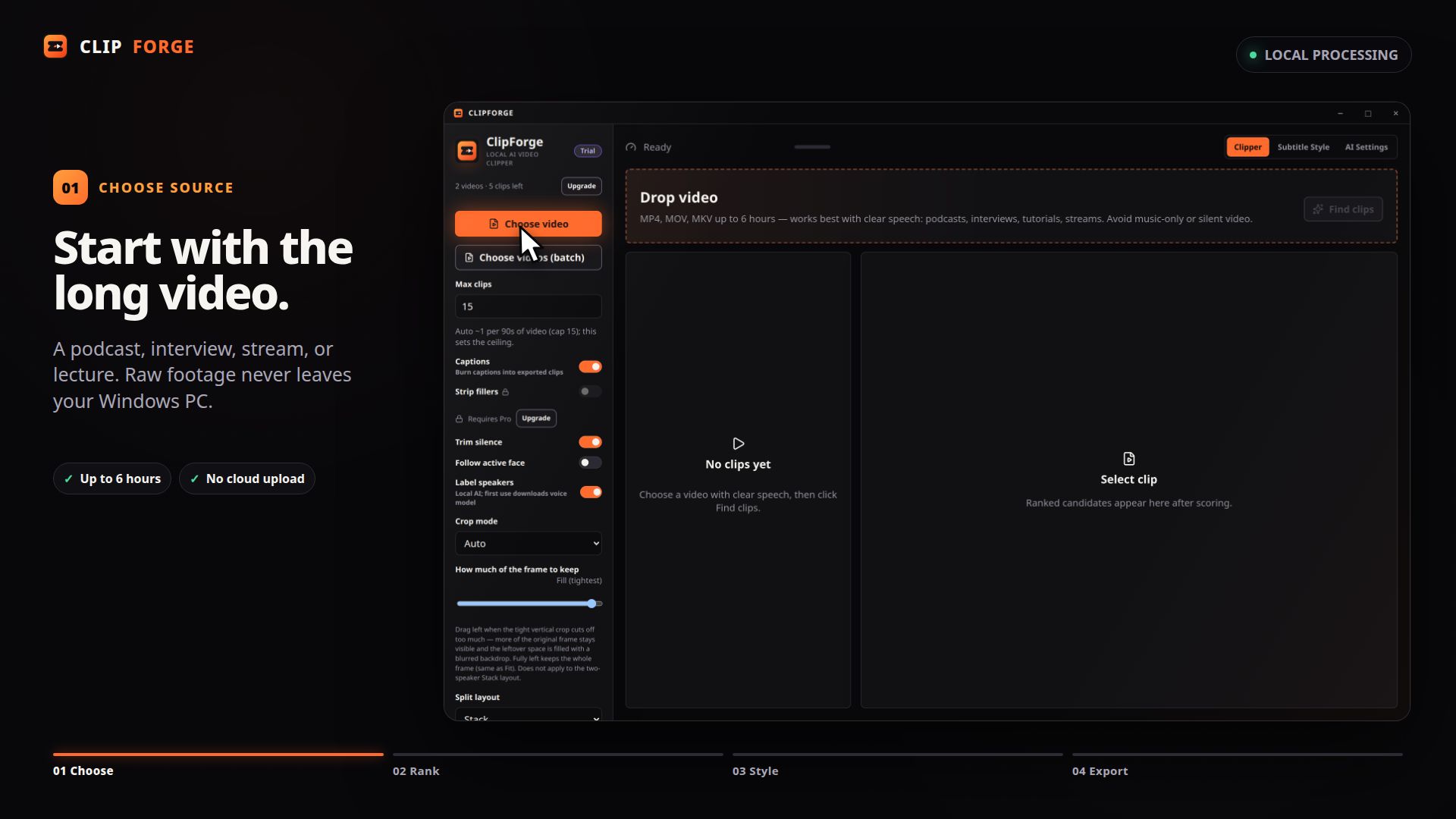
Real ClipForge UI; no customer footage. Sample footage and dialogue: Sintel © Blender Foundation, durian.blender.org, CC BY 3.0. Blender Foundation does not endorse ClipForge.
Why desktop wins here
Big files stay beside you. ClipForge does the heavy lifting on your machine, then asks the internet only when a feature truly needs it.
Source video, audio, local transcripts, face embeddings, and rendered clips stay on your PC during local processing.
Strong, Good, and Maybe buckets include timestamp, transcript preview, score, and selection reason.
Label speakers, correct turns, choose names and colors, then export styled video or speaker-aware SRT/VTT.
Every tier exports clean clips. Trial limits successful exports; paid tiers never add watermarks.
Actual product screens
These are current ClipForge screens, captured from the app UI.


Start before you pay
No card for free use. No watermark at any tier. Upgrade only when you need more volume or optional LLM ranking.
Free trial
Try the complete local workflow.
Starter
For a steady, lighter workflow.
Pro
For creators clipping long-form often.
Prefer one payment?
Pro features plus updates throughout the current major-version stream.
Starter and Pro are subscriptions: they renew automatically at $9 and $19 per month (or $89 and $189 per year) until you cancel. Cancel any time from your Lemon Squeezy receipt or the billing portal — access continues to the end of the period you already paid for. Lifetime is a single payment with no renewal. Refunds and cancellation →
Windows only (10/11, 64-bit). The installer is not code-signed yet, so Windows shows a “Windows protected your PC” warning on first launch — choose More info, then Run anyway. Install guide →
Straight answers
ClipForge is in unsigned soft launch. Honest limits belong before the download button, not after it.
Read full FAQNo during local processing. Source video, audio, local transcript, and clips stay on your PC. If you enable optional LLM scoring on Pro, transcript text goes to the provider you choose; video and audio do not.
Transcription and rendering work locally after model setup. First-run model downloads, license activation, and optional LLM scoring need internet.
The soft-launch installer is not code-signed yet, so Windows may show an Unknown Publisher warning. Check the published SHA-256 and follow the transparent install steps before continuing.
Windows 10 or 11, 64-bit, with source videos up to 60 minutes each. Split longer recordings before import. Mac is planned, with no committed date.
Two distinct source videos and five successful exports. Re-ranking the same file does not use another video. Failed or cancelled exports do not consume an export.
ClipForge offers a full refund of the original paid purchase when requested within 14 days. Mandatory consumer rights still apply.
Cloudflare Web Analytics may load an aggregate traffic beacon. ClipForge uses no ad pixels, cross-site profiles, analytics cookies, local storage, or fingerprinting. Cloudflare may separately set strictly necessary security cookies to protect the service. Lemon Squeezy receives the normal checkout request only after you choose a paid plan.
Your next long video is enough
2 videos. 5 successful exports. No card. No upload. No watermark.